
CS-Cart Vendor Password Field

The Vendor Password Field add-on for CS-Cart allows the admin to control how and when the password fields are displayed for vendors during registration and first login. Using the Select Input Field option, the admin can decide after which profile field the password and confirm password fields will appear on the vendor registration or profile form.
With the Vendor Password Update setting enabled, vendor admins are required to change their password on their first login, ensuring better account security. During registration, the Password and Confirm Password fields allow vendors to create and verify a secure password, reducing login errors.
Features:
- Admin Control over Password Field Position: Allows the admin to choose after which profile field the password and confirm password fields will appear on the vendor registration or profile form.
- Password & Confirm Password Fields: Displays password and confirm password fields during vendor registration, ensuring vendors create and verify a secure password.
- Mandatory Password Update on First Login: Enable this option to require vendors to change their password when they log in for the first time.
- Error-Free Password Confirmation: Ensures the entered password and the confirmation password match correctly, reducing login issues.
- Enhanced Vendor Account Security: Works with CS-Cart security settings to enforce password updates and improve overall vendor account protection.
- CS-Cart Support Information: The addon is well-integrated with CS-Cart Multi-Vendor and can be used with its Standard, Plus, and Ultimate versions.
Installation:
How to install Addon
https://store.ecarter.co/blogs/how-to-install-addon/
Workflow
Admin Settings Configuration
These settings allow the admin to control how the vendor password field works during vendor registration or login.
- Select input field: This option allows the admin to choose the profile field after which the password field will be displayed on the vendor registration or profile form.
- Vendor Password Update: When this option is enabled, vendor admins are required to update their password on their first login.

Password & Confirm Password Fields on Vendor Registration
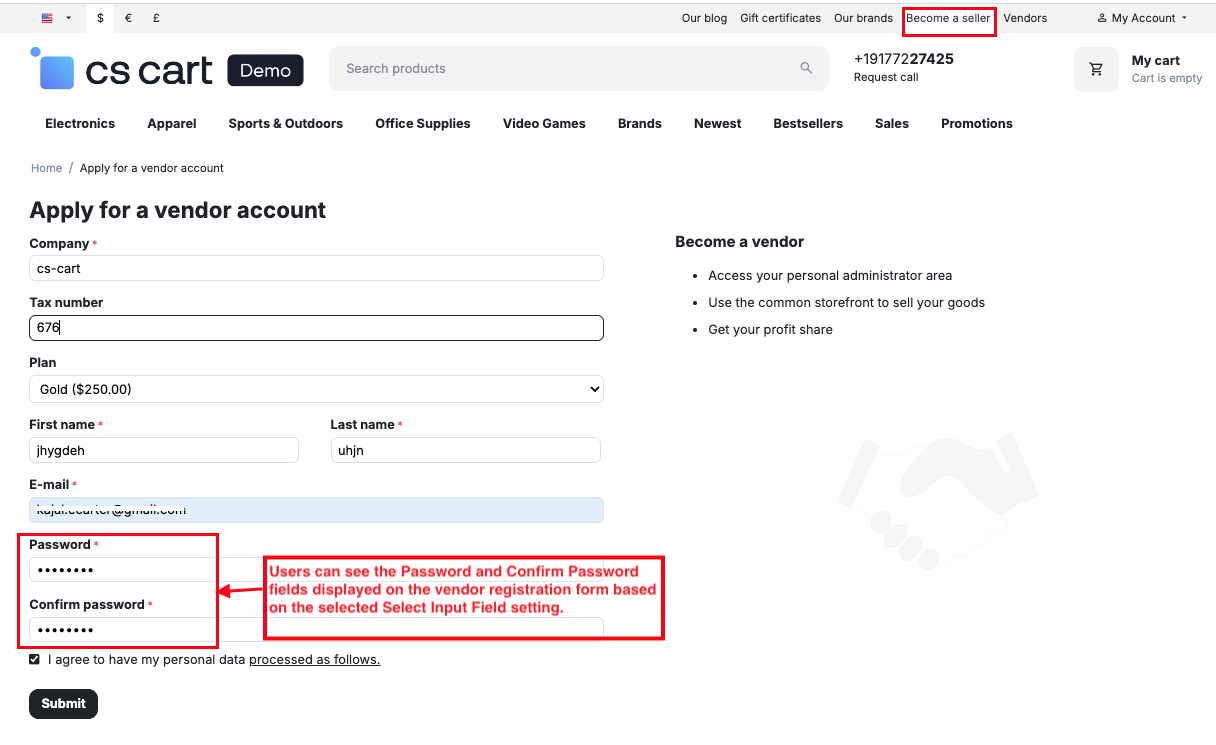
These fields appear on the vendor registration form according to the selected Select Input Field setting, allowing vendors to create and confirm their password during signup for secure account access.
- Password: This field is displayed on the vendor registration form according to the Select Input Field setting, allowing vendors to set a secure password during signup.
- Confirm Password: Shown along with the Password field, this option ensures the entered password is rechecked and matched correctly to prevent login errors.
- Enable the "Vendor Password Update" setting to require vendors to change their password on first login.

- Go to the Settings >> General >> Security Settings.
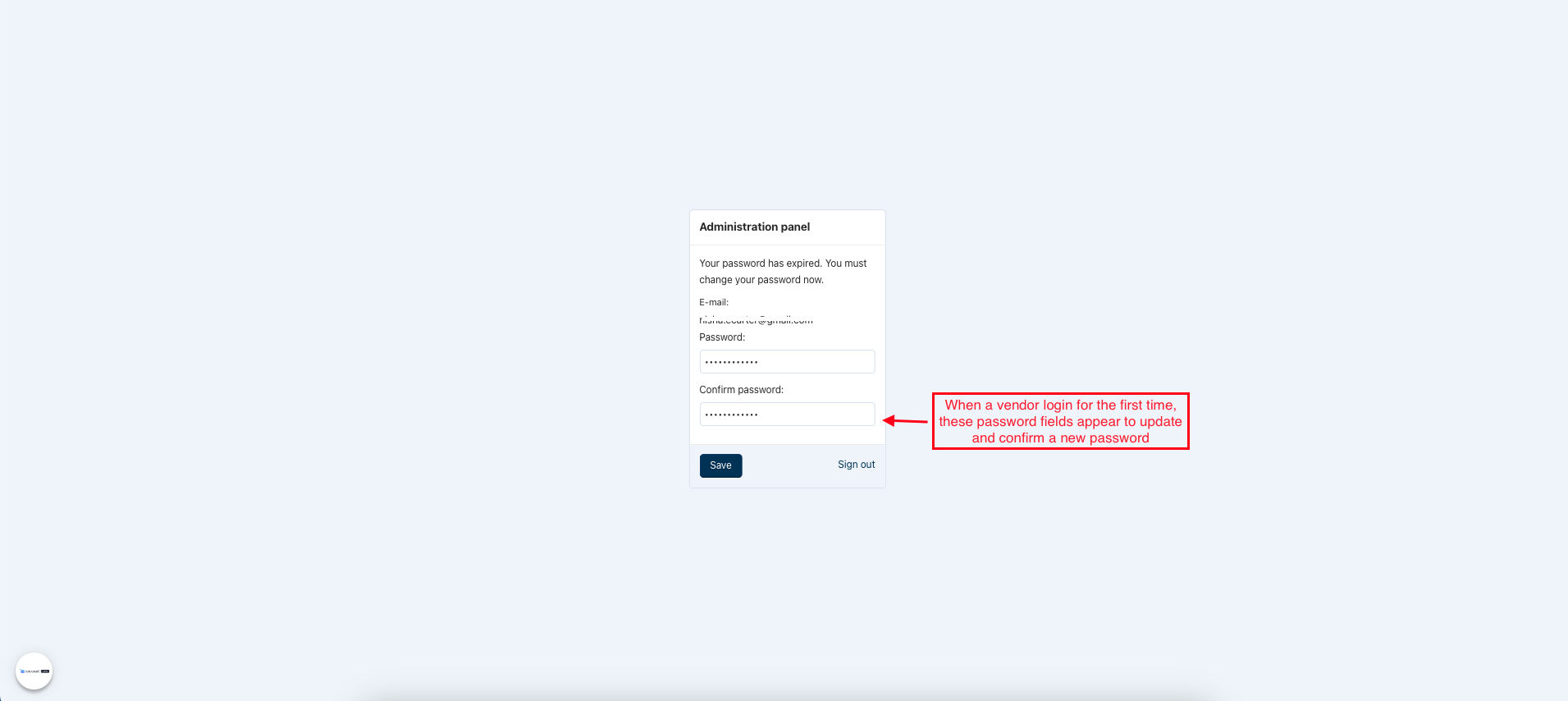
- Force administrators to change password on the first login: When enabled, administrators must update their passwords during their first login to ensure account security.

- When a vendor login for the first time, these password fields appear to update and confirm a new password.
Final Thought:
This add-on helps admins manage vendor passwords more securely by controlling password field placement and enforcing password updates on first login. It improves account safety, reduces login issues, and ensures a more secure vendor onboarding experience in the CS-Cart marketplace.
Addon-Version
Version-1.0.3
Supported Versions:
CS-Cart, CS-Cart Multivendor 4.8.x, 4.9.x,4.10x,4.11x,4.12,4.13x, 4.14x, 4.15x, 4.16x, 4.17x, 4.18x
Support:
This add-on is developed and published by Ecarter Technologies Pvt.Ltd., a CS-Cart developer. You are guaranteed a quality add-on supported by future versions. If you need help, please contact us via email at support@ecarter.co.




Ecarter Support
Typically replies within a minute

© 2020 - 2026 Ecarter Technologies Pvt Ltd.